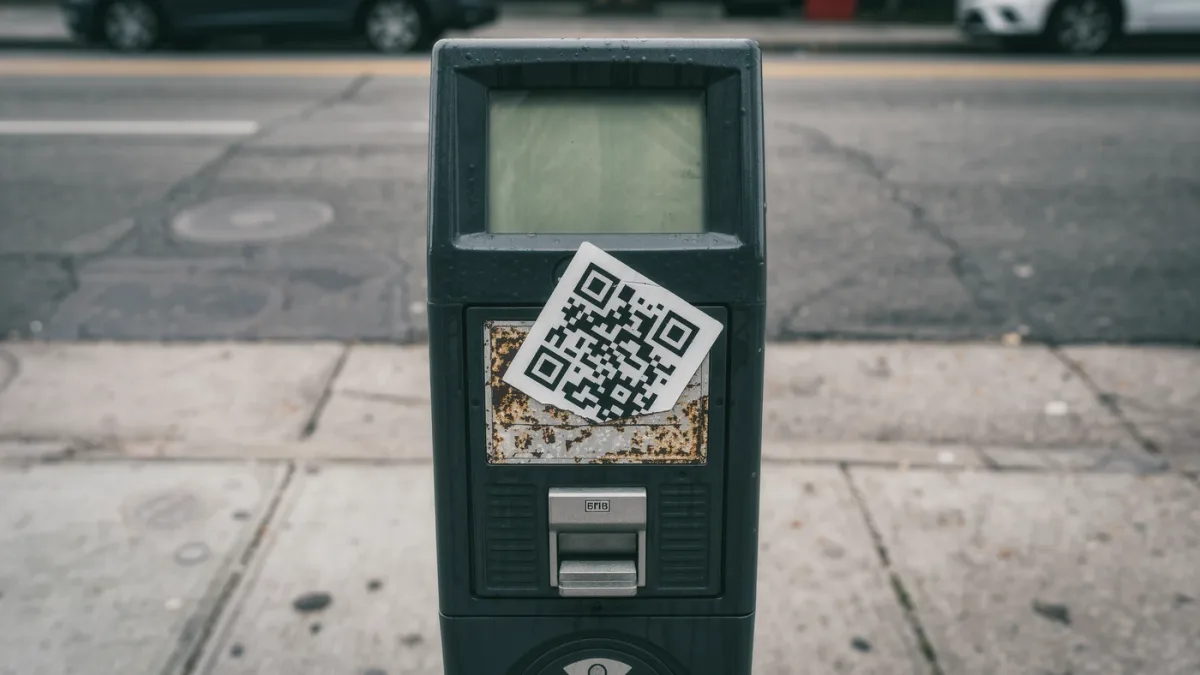
Quishing — QR-code phishing — embeds a malicious link in a QR code instead of clickable text, sending you to a fake login page or a malware download the moment you scan. The trick works because the QR image defeats both of the habits that protect you in email: you cannot hover a QR code to preview its URL, and email security filters read far less reliably inside images than in text. The rule that neutralizes nearly all of it: scan QR codes only from physical materials you have reason to trust — parking meters, restaurant menus, product packaging — and never from emails, texts, or stickers you did not seek out.
How does a quishing attack work?
The attacker generates a QR code pointing to a lookalike domain — a fake Microsoft 365 login, a parcel-redelivery payment page, an office-coffee-list sign-in — and delivers it where your guard is down. Reported variants include fake unpaid-parking invoices mailed as letters, codes on stickers pasted over real codes on parking meters and shared-bike docks (the parking meter and EV-charger sticker scam has recurred in multiple countries), codes inside PDF attachments that evade email link scanners, and codes on posters urging immediate action. Scanning opens the URL in your phone's camera browser, which typically has no password-manager integration, fewer protections than your main browser, and — critically — no address-bar skepticism until the page has already loaded. From there the page is ordinary phishing: harvest credentials, prompt an app install, or process a small fraudulent payment.
Why do attackers bother, when links work?
Because QR codes move the attack to the device and channel with the weakest defenses. Corporate email filters inspect URLs and attachments aggressively; a code inside an image or PDF often passes untouched. The scan itself shifts the victim from a managed laptop onto a personal phone, outside corporate proxies and endpoint protection. And the destination URL is invisible until after the jump — no hovering, no reading the domain before committing. Cybersecurity agencies including the U.K.'s National Cyber Security Centre and the FBI have issued public warnings about malicious QR codes as adoption of codes for payments and menus has grown.
What are the signs of a malicious code?
Context is nearly everything, but the markers recur:
- Urgency plus payment — unpaid tolls, pending fines, suspended deliveries requiring a small fee, all with a code to resolve it now.
- Codes arriving electronically — in emails, SMS, or PDFs. Legitimate businesses rarely need to hand you a paper-era artifact through a digital channel that supports plain links.
- Stickers over printed codes — on meters, chargers, or parking signs, a slightly misaligned or larger sticker on top of the original is the classic overlay scam.
- Requests to scan to receive money — no legitimate refund, grant, or giveaway needs you to scan anything.
How do you scan safely?
Four habits, in order of usefulness:
- Interrogate the source before raising the camera. Did this code come from something I sought out, or something that sought me out? Treat any code delivered inside a message as a link you would not click — because that is exactly what it is.
- Check the preview before opening. Modern phone cameras and QR apps show the decoded URL before visiting. Read the domain with the same skepticism as a link in an email: last two segments, lookalike letters, nothing about "login-secure-verify" in a subdomain.
- Prefer the official route. If a code claims to be your bank, parcel service, or parking authority, ignore it and open their app or site yourself. The code adds nothing legitimate that the official channel lacks.
- Inspect public codes physically. A sticker placed over another sticker, a code that looks newer than the sign it is on, or a meter whose original payment screen still works — pay the way the machine originally intended and peel or report the overlay.
What if you already scanned and entered something?
The response is the standard phishing playbook, executed on the phone: change the password for the account you entered (and everywhere it was reused), revoke sessions in that account's security settings, contact your bank immediately if payment details were entered, and report the code — to the venue where the sticker was placed, and for U.S. users to the FBI's IC3. Phones are not immune to what follows credential capture, so watch for unexpected app installs and configuration-profile prompts in the days after, and reject any profile you did not deliberately install.