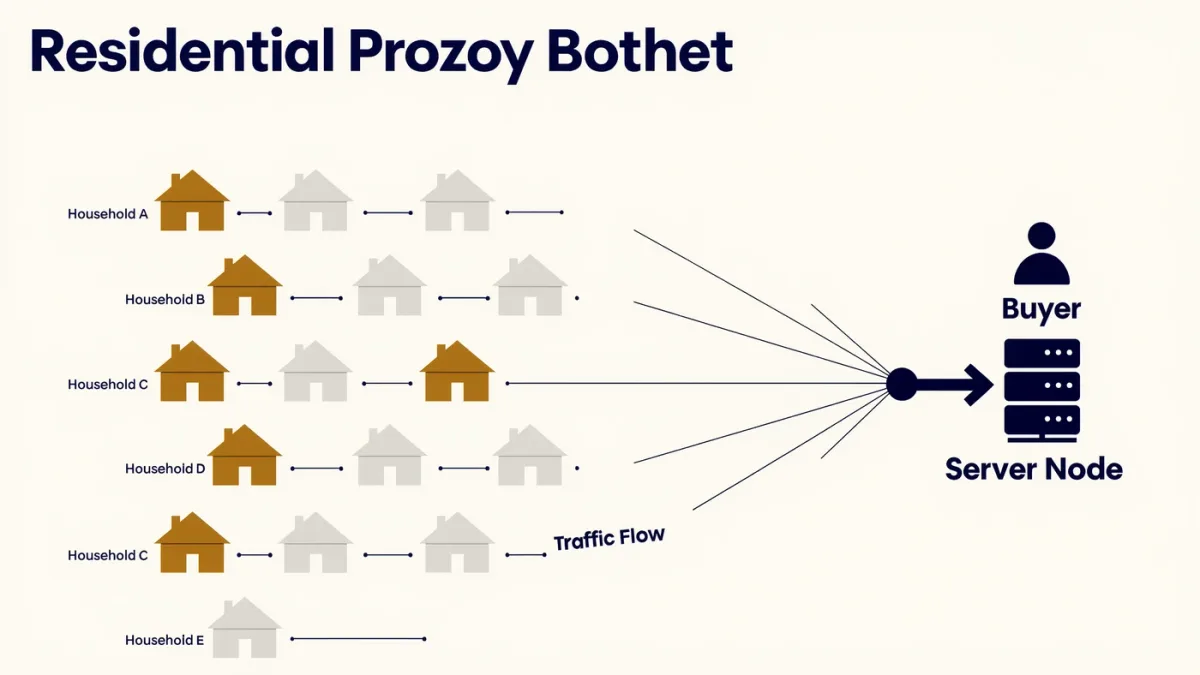
A botnet is a network of hijacked devices — routers, cameras, DVRs, sometimes laptops — under an attacker's remote control, and its modern business model has evolved from brute disruption into quiet rental: your compromised router can be sold by the hour as a residential proxy, routing other people's traffic through your home IP address so it looks like a legitimate residential user. Owners rarely notice; the device works fine while someone else's credential stuffing, scraping, or ad fraud flows through it. The defense is the boring stack — firmware updates, changed default passwords, and retiring gear vendors abandoned — plus one symptom worth knowing: internet that slows mysteriously at odd hours.
How do devices get conscripted?
En masse, through the same doors for two decades: default and weak credentials, and unpatched firmware on internet-facing gadgets. Mirai, the 2016 landmark, scanned the internet for cameras and DVRs still using factory logins and assembled hundreds of thousands of devices — enough to knock major services offline in record-setting DDoS attacks. Its source code leaked, and its descendants and rivals (Gamaredon-adjacent strains, Androxgh0st against cloud credentials, the VPN-filter-era router campaigns, and the 2023-2025 FBI-disrupted Chinese-linked router botnets like Volt Typhoon's KV-botnet) have kept the playbook running against routers, NAS boxes, and IoT gear. The FBI has repeatedly urged owners to reboot and update routers after botnet takedowns — because infections often live in memory and reinfect through the same unpatched flaw the next day.
What are botnets used for?
- DDoS extortion and vandalism — the loud, original use: rented firepower to knock sites offline.
- Spam and phishing distribution — volume mail from a million clean-ish home IPs.
- Credential stuffing and brute force — distributed attempts that evade per-IP rate limits.
- Scanning and proxy service — the quiet majority: infected devices as anonymous infrastructure for other criminals' work.
- Click fraud — faking ad traffic for revenue.
What is the residential-proxy twist?
The cleverest commercialization: legit-looking IP addresses are valuable because websites block data-center IPs but trust residential ones. So botnet operators and "legitimate" proxy businesses (some with fine-print SDKs inside free apps, some purely criminal) sell home-IP bandwidth by the gigabyte — buyers scrape sites, run sneaker-bot purchases, conduct ad fraud, and make scam logins appear local. Security researchers documented major criminal residential-proxy networks like NSOCKS and anyproxy over the years; the grey-market versions wrap the same product in terms of service. If your router is conscripted, you are paying the electricity for someone else's fraud, and the complaints land at your door.
How do you know if a device is in one?
Direct signs are scarce. Watch instead for: internet slowdowns at unusual hours (uplink saturated by proxy traffic), a router running hot or with mysteriously changed settings, ISP warnings, devices that seem slow despite fast speed tests, and appearing in blocklists — some security sites let you check your IP against known botnet indicators. Post-FBI-takedown advisories have repeatedly told router owners to reboot, update, and — where infections persist — factory-reset and reconfigure, because some strains survive reboots in storage.
How do you keep your devices out?
- Update router firmware and enable auto-updates — the single highest-value step, per our router guide.
- Change default passwords everywhere — cameras, doorbells, and IoT gadgets included; Mirai's lesson remains lesson one.
- Retire end-of-life devices. The gadget the vendor stopped patching is the industry's raw material.
- Keep smart devices off the main network — guest-network isolation limits what a conscripted camera can reach inside your house.
- Reboot and check after public takedown notices involving your device type — the FBI's announcements name the affected families.
The botnet economy runs on the population of forgotten devices with factory passwords and abandoned firmware. Every updated router is a unit of inventory removed from the market — which makes patching your own hardware a small, genuine act of collective defense.